OCR is one stage of cheque processing. The Azimut SDK can read printed and handwritten fields, validate the MICR line, return field confidence, and keep uncertain or inconsistent items in a review path before the application hands them to clearing or core banking. Recognition results depend on the field, image quality, cheque stock, capture channel, and configured thresholds, so accuracy should be measured on a representative deployment corpus rather than treated as a universal percentage.
How the cheque ocr & fraud detection flow works
Every step is managed by the SDK. Your application calls SDK methods and receives results — the device interactions happen inside the platform layer.
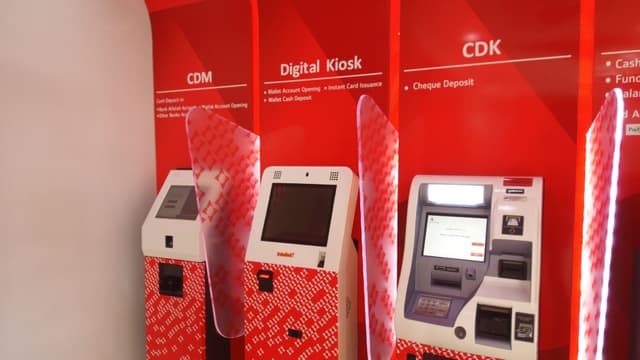
Image capture — kiosk or desktop scanner
The SDK accepts cheque images from CDM-embedded scanners at self-service kiosks and from desktop document scanners at teller or back-office workstations. Front and rear images, image-quality checks, and capture metadata depend on the connected hardware and channel.
MICR line reading and validation
The SDK reads and validates the MICR line (account number, sort code, cheque serial number) using E-13B or CMC-7 encoding. MICR characters are independently validated against the cheque number printed in the courtesy amount region — mismatches are flagged before OCR extraction continues.
OCR field extraction — printed and handwritten
The processing path can extract payee, date, written amount, and numeric amount from printed and handwritten cheque fields. Each result can carry field-level confidence so the application can set a straight-through threshold and send uncertain reads to review. Results should be benchmarked by field on representative cheque images.
Cross-field validation
The workflow compares related values such as the written and numeric amounts, cheque number and date, then applies the rules agreed for the deployment. A mismatch can be held for review instead of being passed downstream as a clean item.
Image, duplicate, and risk checks
Image-quality failures, duplicate indicators, amount discrepancies, and other configured risk rules can produce discrete results for the application or an exception queue. The exact checks depend on the capture hardware, connected services, and operating policy.
Clearing and core banking posting
Approved results can be exchanged with clearing, core banking, ERP, or reconciliation systems through the interface agreed for the deployment. A rejected or unavailable downstream system should leave the item in a traceable repair state so it can be resolved without an ambiguous re-submission.
What the SDK extracts from each cheque
Cheque data extraction returns the configured fields as structured data with per-field confidence scores. The same processing boundary can serve bank check images from a kiosk-embedded scanner or a desktop document scanner, subject to the connected capture integration.
Payee name
The pay-to name, extracted from printed or handwritten cheques with a confidence score for downstream validation.
Date
Cheque date read and normalised, with stale-dated and post-dated cheques flagged for the application to act on.
Legal amount (written)
The amount written in words, with confidence and validation against the numeric amount where that rule is configured.
Courtesy amount (numeric)
The numeric amount, cross-checked against the legal amount so written/numeric mismatches surface before clearing.
MICR line
The configured MICR fields, such as account, routing or sort data, and cheque serial, read and validated for the deployment’s cheque format.
Image and processing status
Capture quality, validation outcomes, confidence, and exception state give the application a traceable decision for each item.
What the SDK handles
Hardware
- Kiosk-embedded cheque scanner (front/back where supported)
- Desktop document scanner (teller and back-office)
- MICR reader (E-13B and CMC-7)
- Cash acceptor / CDM
- Receipt printer
Integrations
- Core banking APIs
- Cheque clearing networks (MICR E-13B / CMC-7)
- Image-quality and validation services
- Exception and review workflows
- Fraud and duplicate-risk services where connected
- 1LINK and RAAST (Pakistan)
Deployed with
Production deployments running cheque ocr & fraud detection flows in real environments.

Bank Alfalah
Cash and cheque deposits at Digital Branch kiosks. OCR extraction and clearing integrated through the SDK.

Bank Al Habib
Live production cheque deposits via CDMs, with active operational support for clearing and exception handling.

Diamond Trust Bank
Cheque deposit flows at self-service kiosks. SDK handles scanning, data extraction, and core banking posting.
Banque Atlantique
Cash and cheque deposits via CDMs across the West African network.