
How the cash deposit flow works
Every step is managed by the SDK. Your application calls SDK methods and receives results — the device interactions happen inside the platform layer.
Customer identification
Account lookup via card swipe or biometric verification. SDK manages the session from this point forward.
Cash insertion
SDK accepts bills and cheques, counts denominations, handles multi-note errors, and prompts for reinsertions without the application managing device state.
Amount confirmation
Real-time count displayed before the customer confirms. SDK holds the session in a safe state until confirmed or cancelled.
Transaction posting
SDK sends the confirmed amount to the core banking API. Handles success, failure, and partial-credit states — and retries where the network spec allows.
Receipt and session close
SDK triggers the receipt printer, logs the transaction, and cleanly ends the device session.
What the SDK handles
Hardware
- Cash acceptor
- Cheque scanner
- Receipt printer
- Biometric scanner (optional)
Integrations
- 1LINK interbank clearing
- RAAST instant payments
- Core banking APIs
Deployed with
Production deployments running cash deposit flows in real environments.

Bank Alfalah
Cash and cheque deposits at Digital Branch kiosks.

Meezan Bank
Cash deposits via CDMs.

Diamond Trust Bank
Cash deposit flows via self-service kiosks.

Bank Al Habib
Live production cash and cheque deposits via CDMs, with active operational support.
DIB Bank
CDM deployment completed for cash deposit self-service flows.
Faysal Bank
Cash deposits via CDMs integrated through the SDK.
Related solutions
From the blog
See how businesses are using Azimut SDK
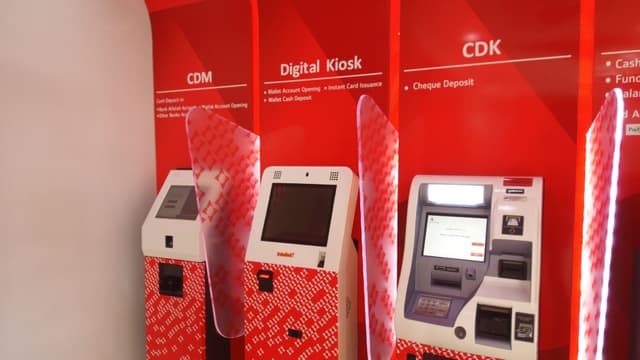
Live production CDM support
Cash and cheque deposit flows are live in the field, with active operational support for CDM service events.
Completed CDM deployment
The CDM deployment for DIB Bank has been completed and is part of the SDK's banking self-service footprint.
Cash deposit services via CDMs
Faysal Bank is part of the CDM deployment pattern supported by the SDK.