

Build a McDonald’s-Style Self-Service Kiosk with Azimut SDK
Published: 28/10/2026
For a hardware manufacturer or software company, a McDonald’s self-service kiosk is a familiar reference for a product you could build: a screen where customers choose what they want, an application that manages the order, and connected devices that complete the transaction. McDonald’s describes self-order kiosks as part of its restaurant technology.
Your team can build its own restaurant ordering experience on Azimut SDK. You choose the enclosure, computing hardware, customer interface and business systems. Azimut provides the middleware between your application and the supported physical devices, so you can combine printers, scanners, payment terminals and cash equipment without putting each device’s protocol into your application.
The architecture below describes how to build your own system with Azimut. It does not describe the technology inside McDonald’s kiosks.
Separate the ordering application from the hardware
A self-service kiosk brings together work that different teams often own. The application displays the menu, manages customisations, calculates the basket and guides the customer through checkout. Restaurant systems supply prices and availability, record orders and send work to the kitchen. Physical devices handle actions such as scanning a loyalty code, taking a payment or printing a receipt.
Connecting the application directly to each device creates work every time the hardware changes. One printer may use a different command set from another. A scanner may need a different vendor library. A cash device has its own states, errors and recovery behaviour. Those differences can spread into the ordering software unless there is a common layer between them.
Azimut SDK provides that layer. It runs as middleware, exposes device operations through a JSON API, and handles supported device communication underneath. Despite the SDK name, your team integrates with a running platform through HTTP requests rather than installing a separate library for every application language.
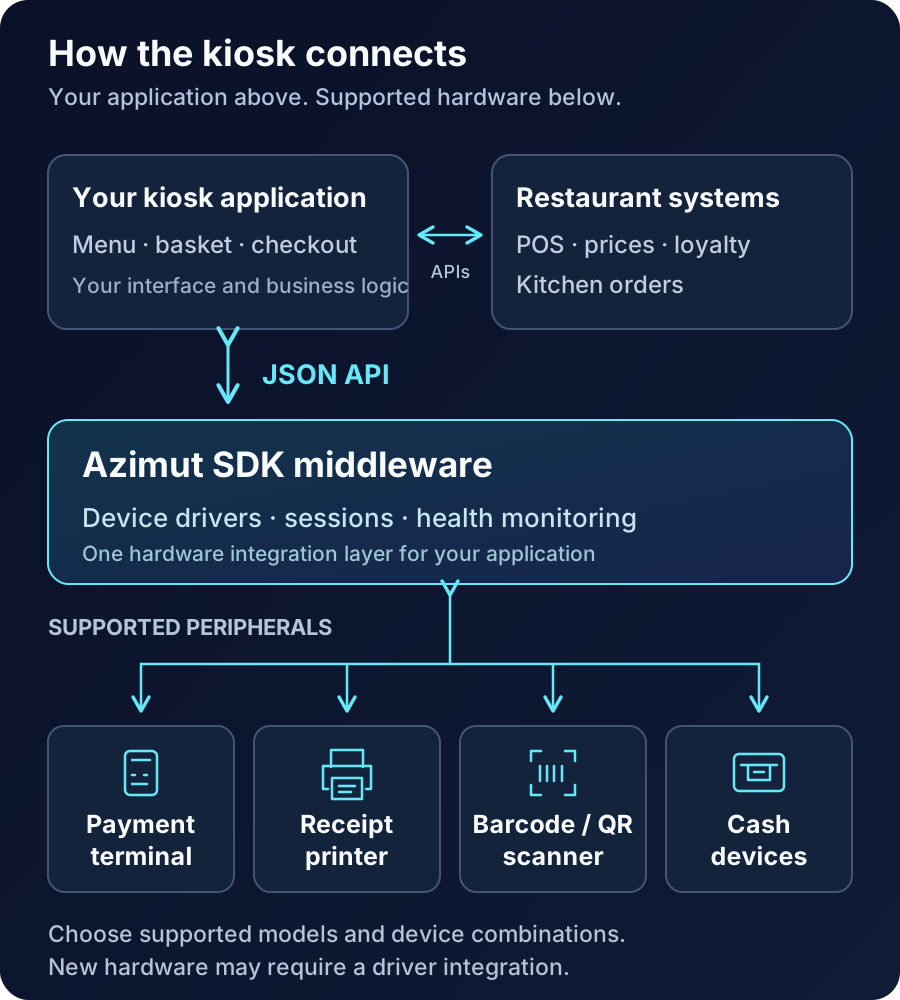
The touchscreen displays your application through the kiosk’s operating system. Restaurant backend connections remain part of your application integration. Azimut handles the supported peripherals used within that journey.
Choose the hardware combination your service needs
A restaurant that takes card payments may need a touchscreen, computer, payment terminal and receipt printer. Another location may add a scanner for loyalty codes or prepaid vouchers. A site accepting cash could also need a note acceptor and equipment for returning change.
Those choices should follow the service you want to offer. A compact countertop unit and a freestanding kiosk can present the same ordering application while using different supported peripheral models.
| Kiosk configuration | Hardware combination | Application work |
|---|---|---|
| Card ordering | Touchscreen, computer, payment terminal and receipt printer | Menu, basket, payment flow and order submission |
| Loyalty and voucher ordering | Card ordering hardware plus a barcode or QR scanner | Retrieve loyalty details or validate a voucher through the relevant business service |
| Cash and card ordering | Card ordering hardware plus a cash acceptor and suitable note or coin dispensers | Track the amount paid, change due and the agreed exception process |
| Ordering with payment at the counter | Touchscreen, computer and ticket printer | Create an order reference and keep payment status separate until counter payment is confirmed |
Hardware independence gives you a way to support these combinations through a common integration approach. Compatibility still needs to be confirmed for the exact models, firmware, operating system and required functions. Existing SDK drivers cover supported devices; a device outside the catalog needs a driver integration before it can join the configuration.
Once a compatible driver is available, your application can use the established operations for that device family. Hardware-specific work stays in the middleware. A replacement device with different capabilities may still require changes to the customer journey, such as removing cash change when the new configuration cannot dispense it.
Build the ordering journey in your preferred language
Azimut exposes one JSON API that your team can call from C#, Java, Python, Node.js or another runtime with an HTTP client. A shared response envelope gives developers a consistent way to read device outcomes, while each device family exposes the operations it supports.
For a restaurant kiosk, your application could first check whether the required peripherals are ready, then let the customer build a basket using menu data from your backend. At checkout, it coordinates the selected payment flow and reads the relevant device results. Once payment and order acceptance are confirmed, it displays the collection reference and requests a receipt.
Your restaurant software remains responsible for menu rules, taxes, discounts, stock availability, loyalty and kitchen routing. Payment authorisation and settlement depend on the selected terminal, processor and acquiring arrangement. Confirm the terminal integration and payment requirements for the deployment; connecting a terminal through middleware does not replace those arrangements.
This division gives software companies room to build a distinct product. The restaurant controls its branding and service rules, your application controls the experience, and the SDK handles the supported hardware beneath it.
Design for interrupted transactions
The important engineering work includes what happens between a successful device action and the next business action. A payment might succeed while the order request times out. A receipt printer might run out of paper after an order has been accepted. A customer might leave while a device operation is still pending.
Your application should track payment, order acceptance and receipt printing as separate outcomes. If a payment result is uncertain, check it through the payment integration before asking the customer to pay again. If order submission times out, use an order reference and backend duplicate protection to establish whether the order already exists before resending it. A failed print should offer an agreed recovery route without creating another order or charge.
For cash, define how the application handles partial payment, cancellation, unavailable change and money already accepted. Those paths depend on the selected equipment and the restaurant’s operating process. Device results from the SDK supply part of the information; your application and backend decide how the transaction proceeds.
Test these cases on the actual kiosk configuration, including disconnects, restarts and late responses after a session ends. A successful demonstration of ordering and payment is the beginning of acceptance testing.
Give hardware and software teams a reusable foundation
For hardware manufacturers, the opportunity is to offer several kiosk designs around a consistent software interface. You can choose components for enclosure size, service access, local availability and cost, then confirm their SDK support. Your customers can build applications against the middleware without receiving a different device integration project for every configuration.
For software companies, the opportunity is to deliver the same ordering product across several supported hardware builds. Your team can spend more time on the menu experience, restaurant integrations and checkout behaviour while keeping device protocols inside the SDK layer. System integrators can bring the two sides together for a restaurant operator.
Once kiosks are deployed, Satellite device management can support fleet visibility and application releases on supported managed devices. SDK device health helps operators investigate peripheral faults. The available monitoring and recovery controls depend on the deployed hardware, operating system and configuration.
Start with one complete service: the customer selects an item, pays through the chosen route, receives a confirmed order reference and can recover if a step fails. Agree the hardware configuration and backend responsibilities, then validate that journey before expanding to more locations or device combinations.
To build a self-service kiosk with Azimut, bring your proposed hardware list, operating system, application stack and restaurant integration requirements. We can review the hardware integrations, identify any driver work and define a proof of concept around your own ordering experience. Talk to the Azimut team.
Try it yourself
Book a demo
See how Azimut SDK works in your self-service environment. We'll walk through your use case, hardware setup, and integration options.
Continue reading
Passport Reader SDK: A Practical Kiosk Integration Guide
Choose a passport reader SDK for kiosks: reader compatibility, MRZ data, capture errors and integration with y…
Integrate the Fujitsu F53 from C# and .NET
Call the Fujitsu F53 cash dispenser from C# over a JSON API: readiness checks, dispense requests, response cod…
One JSON API for Every Language
Why a kiosk platform should expose a language-agnostic JSON API instead of per-language libraries, and what th…